

Showing posts with label review. Show all posts
Showing posts with label review. Show all posts
Saturday, September 26, 2015
GoPro 4 Session Full Review & Price Drop!
While the GoPro 4 Session is both the newest and the smallest GoPro camera ever, it's not necessarily right for everyone. However, Amazon has made it a little easier to decide whether or not you want to get it by dropping the price down on their site to undercut what GoPro is selling it for. Currently it is available for just $324 but that could change at a moment's notice so don't delay. If you are having trouble deciding if the Session is right for you, check out my video below on exactly that.
I really have liked the GoPro Session so far. If you already have a regular GoPro or two like me, then the Session is the perfect addition. It's great for on body mounting, discrete timelapses, or just throwing into your bag and carrying around for vlogging/travel videography. I have only had to replace the built in lens once so far but that was because I crashed my mountain bike while wearing the Session on my chest (I also had to get 18 stitches in my leg).


Wednesday, August 12, 2015
3D Robotics SOLO Drone Review Plus Sample Video Footage and Pictures
My experience this far with the SOLO drone by 3DR has been one of highs and lows. Luckily none of the lows have included flyaways or crashes, but unfortunately the highs were dampened by poor GPS connections, a delayed gimbal delivery date, and shorter than promised radio range in all but the perfect environment. Leaving the delayed gimbal aside (I'll take it as a sign that I need to work on my patience), there are still the two main issues which I and many others have experienced when flying the Solo.
The first is that almost every time I go to fly my Solo it has trouble connecting to the satellites to get a GPS lock. Sometimes this means that I just have to wait 5-10 minutes (the Phantom 3 will GPS lock in less than a minute even in urban environments) but other times I have had to skip flying altogether out of fear of flying without a return to home point created and set. For a drone which 3DR
 |
| A shot of a drive-in theater taken with the Solo. |
Tuesday, June 2, 2015
Jason Derulo "Everything Is 4" Album Review

Only one night after the premiere of So You Think You Can Dance, Jason Derulo's fourth studio album, aptly titled Everything Is 4 was finally released. This album comes just slightly over a year after his previous album Talk Dirty officially launched him into the spotlight with five chart-topping singles including the incredibly catchy Wiggle featuring Snoop Dogg. Since then Derulo has parted ways with his once fiancee Jordin Sparks, completed the Talk Dirty tour, and landed his gig as one of the judges on Fox's dance show So You Think You Can Dance. So how is his latest album? I break it down track by track.
Thursday, April 2, 2015
Sony FDR-X1000V 4k Action Cam Review: GoPro Just Does It Better, For Now
I own several GoPro cameras and constantly am making videos with and about them for my YouTube channel, however, I had not had any experience with Sony's line of action cams prior to purchasing the FDR-X1000V. This is their newest and most advanced model, and is aimed to compete directly with the GoPro HERO 4 Black Edition. With that in mind I performed many tests comparing the quality and features of the two (but more on that later).

First I set about trying to understand every mode and setting which the Sony cam offers. Initially I was extremely put off by several things, namely: the lack of a dedicated on/off button, slow menu response times when tweaking settings on the camera, and the amount of clicks it takes to get through the menus. As I used the cam more and got used to the way Sony does things, the menus didn't seem quite as complex and I was finally able to completely understand the way that the video resolutions
Monday, June 9, 2014
Question: Now that you have used the Tascam DR-40 for almost a year, how do you feel about the audio recorder?
Q: "OK, now that you have used this [the Tascam DR-40] for almost a year are there any things you feel differently about the recorder? I am looking to purchase a recorder and am just researching them. Thanks for your updates."
-Chris Johnson on Tascam DR-40 Unboxing, First Look, Built-In Mics Sound Test, & Review (Budget Sound Recorder)
A: I still am very happy with my purchase. Even though the Zoom H4n is pretty much the go-to when people are looking for a 4 track/2 input audio recorder for under or around $200, I think the Tascam DR-40 is superior in many ways. This was made clear to me this spring when I was taking the entry level film production course at college. We were given Zoom H4's (don't even think about buying) to use for recording the audio for our projects. When I asked the professor why the college didn't have the newer Zoom H4n's instead, he replied that all of the onboard mics had simply broken off within the first semester of use. This is one of the main flaws of the H4n which the DR-40 addresses by incorporating metal microphone guards. Even if you don't plan on using the onboard mics, it is still nice to have them not break off just in case you need to use them as backup.
I would definitely still recommend the DR-40 to anyone who was looking for an audio recorder for under $200. I have had nothing break on it and really my only complaint is that the SD card slot's rubber door is sometimes hard to get open.
Wednesday, October 23, 2013
NEW GoPro HERO 3+ Black Edition Review, Unboxing, Essential Accessories and More
About two weeks ago I finally received the product that I have been anticipating the release of for so long: The new GoPro HERO 3+ camera that I ordered. This new generation of camera looks almost identical to the old model (the GoPro HERO 3) even though it received many hardware upgrades and is in fact 20% smaller and lighter. GoPro claims their new camera has a 30% longer battery time, 4x faster WiFi, improved audio, a 33% sharper image, and better low light performance. On top of all of those improvements, they also added a new "Superview" mode and increased the framerates at 720p and 1080p to 120fps and 60fps respectively.
Though I have never owned a GoPro before, it very apparent when unboxing the product that they had changed nothing in the packaging process. Along with the camera, you also receive the same extras in the box as previous generations, so expect a waterproof housing, Wi-Fi remote, li-ion battery, quick release buckle, vertical quick release buckle, 1 curved + 1 flat adhesive mount, 3-way pivot arm, and a USB charging cable. Check out the unboxing I did below for more information.
My first test of the GoPro was to test it's low light capabilities as well as it's time lapse feature. I headed out just at sunset to capture the setting sun and stayed out for a good while after it was dark snapping pictures and filming video. I was slightly disappointed with the low light video performance, however, the stills and the timelapses I took (which are just a bunch of pics) turned out great. Below I included a frame from both a time lapse and a video to give you an idea of how the two compare.

Though I have never owned a GoPro before, it very apparent when unboxing the product that they had changed nothing in the packaging process. Along with the camera, you also receive the same extras in the box as previous generations, so expect a waterproof housing, Wi-Fi remote, li-ion battery, quick release buckle, vertical quick release buckle, 1 curved + 1 flat adhesive mount, 3-way pivot arm, and a USB charging cable. Check out the unboxing I did below for more information.
As soon as I opened it I couldn't wait to get shooting, and luckily since I knew that I would need a micro SD card (check GoPro's list of recommended brands) I had ordered one in advance so that I would be ready to go by the time my GoPro arrived. I had also gone ahead and bought some basic accessories for my new GoPro such as a case, flexible tripod, head strap, caps and doors kit, tripod adapter, and some extra batteries. For links to all the products I bought as well as a look at each item, check out my video below.
 |
| The video is cropped because of how the GoPro sensor handles video compared to pictures. |
Already after using the camera for the short period that I did, I could see a need for a few more accessories, mainly to allow me to do longer time lapses than the built in battery allowed for. So I ordered an external battery from Anker along with the GoPro frame mount to allow me to attach my camera to my tripod while still having access to the charging port. I also picked up an awesome suction cup mount from RAM to allow me put my GoPro in more places; say a window or a car door.
With this new gear in hand, my next testing grounds for the camera was a service trip to Virginia. Since I brought no other camera along, this trip gave me the opportunity to try out the GoPro's capabilities as a standalone camera. I felt myself wanting my DSLR a lot initially (mainly for its zoom) but once I began to get a feel for the camera, I started to see more angles that would look good through the GoPro's extremely wide angle lens.
As the trip went on I began to realize why so many people say this camera can't take the place of a point-and-shoot. The main reason for this is the lack of a viewfinder. You can preview the image on your phone or tablet, which definitely helps some, but it was very time consuming to make sure a shot was framed right because of the 1-3 second lag. You can always purchase the LCD bacpac from GoPro, but that will run you about $100 and also increase the size of your camera while decreasing battery life.
 |
| A sunset pic with the GoPro |
Though the GoPro comes up short in the "everyday camera" category, it excels when it comes to pre-planned shots and videos where you have enough time to properly position the camera. The time lapse mode still continued to impress me, and now with the added external battery I was able to shoot for over 4 hours (and that only discharged the external battery to about 75%). The video mode was equally good, though the audio with the full case on still sounds pretty bad. Again the lack of a instantaneous viewfinder was a negative, making it really hard to capture artsy or well proportioned shots. If you don't care about where the action is positioned too much, you will love this camera though. It's wide angle lens coupled with it's small size allow you to put it anywhere and capture everything. Superview mode was almost too wide for my liking, however it will definitely be helpful in cases where you can't setup the camera very far away from your subject.
Take a look at the video below to see some of the sample footage and time lapses that I took while on the trip.
Overall, I think that the GoPro 3+ does what it's supposed to do. It gives you a camera that you can put just about anywhere and still be able to capture great footage in various framerates and resolutions. The lack of a viewfinder makes it very difficult to use as an everyday camera though, so if you are considering buying a GoPro for this purpose I would advise you to look elsewhere. If you are looking for a camera to film yourself in extreme conditions, a camera to put in places you wouldn't want to put your DSLR in, or just want a new tech toy to play around with, then the GoPro HERO 3+ is definitely for you.
Saturday, September 21, 2013
APP REVIEW: "Despicable Me: Minion Rush" Free Game for iOS & Android Devices
Like so many apps in the AppStore, Despicable Me: Minion Rush copies the gameplay style of other extremely popular games. In this case, Minion Rush is modeled primarily after three games in particular: Subway Surfers, Mirror's Edge, and Temple Run. If you are at all familiar with these games, you know that they all consist of your character running while you swipe or tilt to avoid obstacles. This is exactly what the objective in Minion Rush is, and the game switches nicely between the different styles of gameplay seamlessly as you reach certain points along your path.

Though this game does copy the game style of other games, Gameloft was able to incorporate enough unique and new content that it should keep you plenty entertained. For example, as your character (an adorable little Minion) successfully passes certain distances, you encounter secret areas, unique boss fights and amazing power-ups. Gru’s Lab, Gru’s Residential Area, El Macho’s Lair and the Minion Beach are all included locations to run through from the movie, but you have to start in Gru's Lab and unlock the other locations from there. Using the bananas you collect while running you can customize your Minion with unique costumes, weapons, and power-ups. If this process of raising 'revenue' is too slow for you, you can acquire tokens through in-app purchases which can be used for buying more bananas, reviving your minion, or skipping goals.


As someone who has played tons of other endless runner games (Subway Surfers, Monster Dash, Temple Run: 'Brave', Jetpack Joyride, Mirror's Edge, Agent Dash, and Temple Run 2…you get the point), I was initially a little put off by the style of this game. However, since I am a HUGE fan of the Despicable Me movies and this game was free, I eventually decided to give it a try. The story behind the game, trying to win the title of 'Minion of the Year', did little to make the game more interesting for me. Surprisingly it was the little things (the voiceovers, the scenery, and the minions actions) that really helped draw me into the game and want to keep playing. The goals/achievements also helped make the game fun and interesting though after awhile they got a little repetitive.
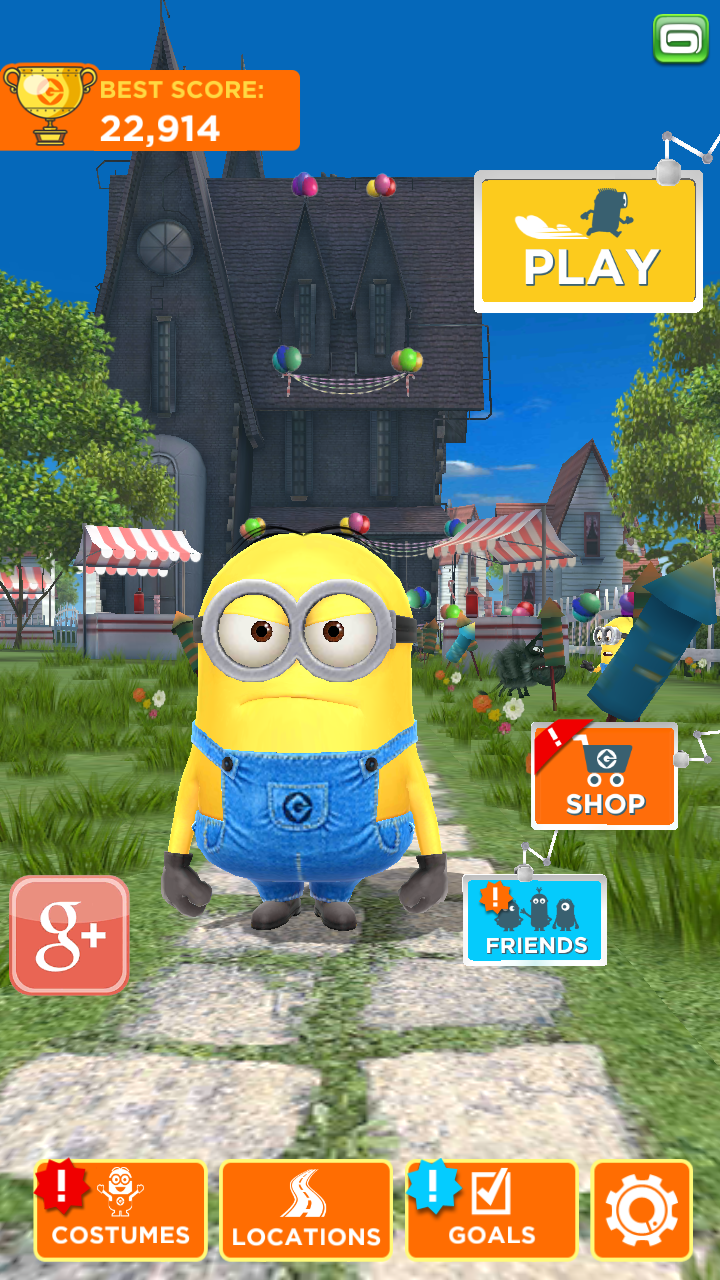

This game is perfect for anyone who is looking for a new endless running game as well as fans of Despicable Me. Younger kids will especially like this game and all it has to offer, while older people might tend to think it is too kiddish after a bit. Ultimately, if you are wondering whether to download Minion Rush, with a price tag of free it won't hurt to give this app a try.

RATING: 4/5 ★★★★☆
-Download-
Wednesday, August 14, 2013
Locket - Get Paid Everytime You Swipe to Unlock Your Android Phone!
A friend of mine who is really into the newest things for android devices recently told me that he was getting paid each time he unlocks his phone to use it. Now, obviously at first this sounds too good to be true, but after I thought about it a little it actually made a lot of sense. What better place to display ads than the lockscreen of people's phones? No one really cares about what's on their lockscreen, so why not put some good looking advertisement there and then pay the user a little bit every time they swipe to unlock their phone? Locket does exactly that.
Don't expect to become a billionaire off this btw, you only get paid $.01 each time you unlock your screen (and to save you some time: yes, the app can sense when you are just locking and unlocking your phone over and over so don't think about gaming the system). So far, about a day after I signed up, I have earned about $.40. Not much, but when you figure that in a month I would make $12 simply by doing something that I already do, then it is a no-brainer.
Check out this video I made reviewing it.
Wednesday, July 17, 2013
Tascam DR-40 Initial Review and First Impressions (Plus Audio Test)
I just received my Tascam DR-40 yesterday and quickly opened it up (filming it so you can watch it below of course) and began testing out it's capabilities. It is very easy to use right out of the box as everything you need to get going, 3 AA batteries and a SD card, is included. I inserted batteries, turned it on, and in no time was testing recording capabilities of the DR-40 with it's built in mics.
With just a little practice (emphasis on little little) I was able to get some good, quality-sounding audio tracks out of Tascam's budget minded recorder. I found that the mics were able to capture vocals, dialogue, instruments (piano), and field recordings (a fountain, a car, bees, a basketball) all pretty accurately. The recording quality also improved as I got better at setting the input levels and mic placement. Check out the video below to see my unboxing of the Tascam DR-40 as well as some sample recordings to give you an idea of the sound.
So far, the Tascam DR-40 has impressed me on all fronts. It offers the ability to record audio that is instantly way better than what you are already getting with your camera's built in mic at a price $100 cheaper than it's main competitor (the ZOOM H4n). I can't wait to try more of the features that the DR-40 offers as well as just spending more time using it because as they say: "Practice makes perfect" (or at least makes better).
Monday, July 8, 2013
Friday, March 1, 2013
Best Camera/Camera Type For YouTube
A lot of people are creating and posting videos to Youtube nowadays (nearly 24hrs of video is uploaded every second). This means that if you want your videos to standout among the crowd they should not only be creative, engaging, and original, but also look good to the viewer. While the look of a video is mainly dependent upon you, the creator, director, cameraman, and producer, no one can deny the effect of filming on a good quality camera or camcorder. Since the majority of the devices on the market today are capable of filming in Full HD (1080x1920), it has become a lot harder to choose the camera which fits your needs. Luckily, I've taken the time to break it all down for you below.
As I see it, there are currently four basic categories to choose from for a video recording device under $1000: mobile devices (cellphones/tablets), point-and-shoots (including Flip Camcorders), camcorders (such as the Canon Vixia), and DSLRs. Like I said, these are basic categories, and they blatantly ignore mirror-less cameras, Wifi enabled point-and-shoots, and other new but rapidly expanding categories.
Mobile Devices:
+Portable and Convenient
+Share-ability
+Can usually edit the footage on the device itself
-No Optical Zoom
-Relatively Low Bit Rates (MegaBytes Per Second)
-Hard to hold steady resulting in the classic "shaky cellphone" look
Point-and-Shoots:
+Relatively Inexpensive
+Small, Lightweight, and Portable
-Few to no manual settings
-Very few accessories available
Camcorders:
+Best Autofocus of any Camera Catagory
+Designed exclusively for videography
+Good built in mics
+Amazing Built in Stabilization
-Designed especially for shooting video
-Slightly more expensive
DSLRs:
+Can do it all
+Able to achieve the "filmesque" look with their shallow depth of field
+Great for manual focusing
+The ability to change lenses
+Tons and tons of accessories available
-Worst at Autofocusing
-Produces very large video files which can be nearly impossible to edit on slower computers
-Slightly more expensive
So these are some of the pros and cons for each category. If you want more information on this and some sample video comparisons, watch the video below:
One thing I just want to emphasize from my video is how having the best camera won't instantly make you a great filmmaker and vice versa. The video that probably demonstrates this the clearest is Sandcastle Sensei by YouTube star Freddie Wong. The video was shot completely on the Samsung Galaxy S3 and it was edited using only iMovie. The video is a testament to Freddie's true talent and proves that he didn't get famous just because he could afford a good camera.
So that's basically it from me on how to choose the best camera for YouTube. If you have any questions on the issue or anything else tech related, feel free to leave them in the comment sor hit me up on Facebook, Twitter, or YouTube and I wish you the best of luck with your next camera purchase!
Subscribe to:
Posts (Atom)